
iTracker360 captures the marketing source behind every lead — UTM parameters, referrers, landing pages, and location — shows you visitors live as they arrive, and syncs it all onto the contact in your CRM without changing your forms. No CRM? Pull the same data from the Leads API.
Works with Keap and GoHighLevel — or no CRM at all · See visitors in real time · Cancel any time
From the click that brought a visitor in, to the source attached to their contact record.
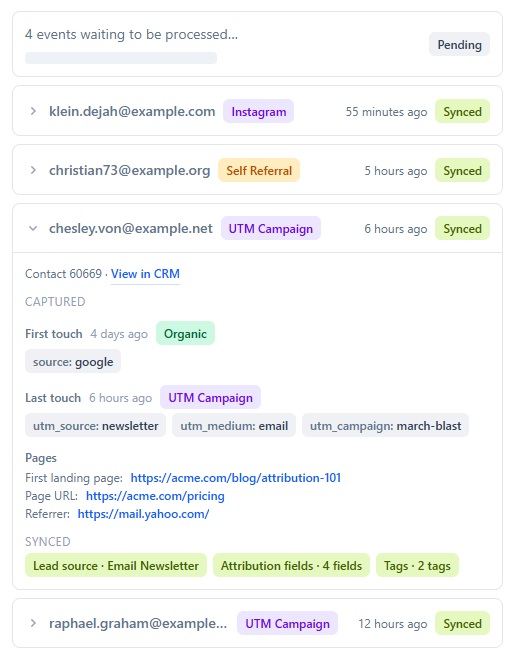
Your live Sync Activity — every captured contact and what synced to your CRM.
One lightweight tracker — live visibility, full attribution, and CRM sync behind it.
First & last-touch
Keep both the original source and the most recent one on every lead.
Live visitor activity
Watch visitors arrive in real time — attributed or anonymous — with their full clickstream journey.
AI-assistant detection
See which visitors were referred by ChatGPT, Perplexity, and other AI tools.
Paid-click attribution
Capture gclid, fbclid, and msclkid so Google, Facebook, and Bing Ads traffic is attributed correctly.
Geo-IP location
Capture city, state, country, and timezone from the visitor's IP.
Tags & custom fields
Turn UTM values into CRM tags and custom fields your automations can use.
URL Builder & short links
Build tagged campaign URLs, shorten them, and track every click.
Lead Source Organizer
Group and clean up messy lead sources, then keep them organized automatically.
Sync with your CRM
Syncs attribution straight onto the contact in Keap or GoHighLevel.
Leads API — no CRM required
No supported CRM? Pull captured leads and their attribution straight from our API.
One-snippet setup
Drop a single JavaScript tag on your site. No form edits, no CRM changes.
WordPress plugin
Prefer WordPress? Install the optional plugin instead of pasting the snippet.
Real screens from the product — this is what your attribution looks like.
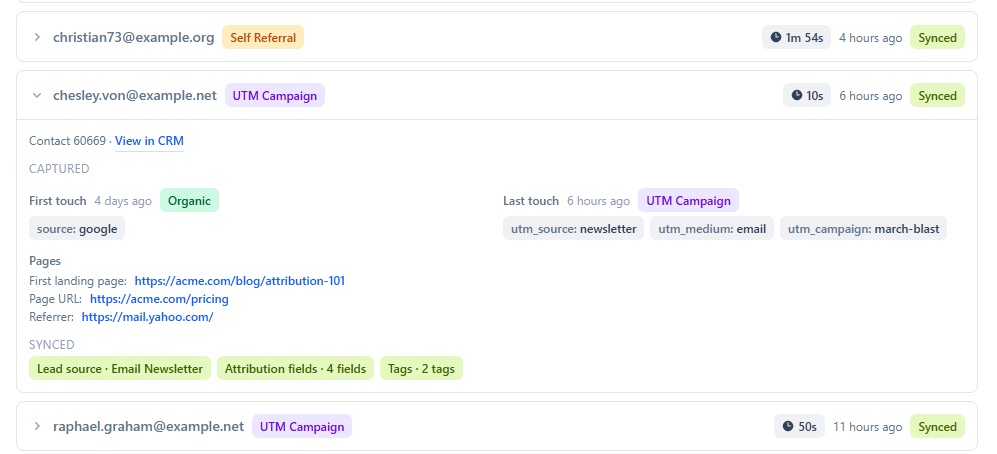
See exactly what gets captured
Every contact shows its first- and last-touch source, the fields captured, and confirmation that it synced to your CRM — no guesswork.
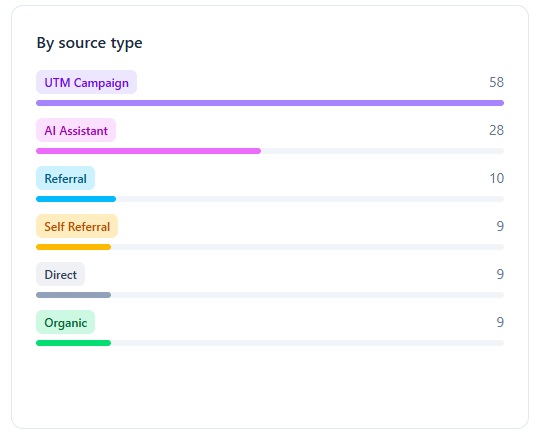
Know where your leads come from
A live breakdown by source type — paid campaigns, AI assistants, referrals, organic, and direct — so you can see what's actually working.
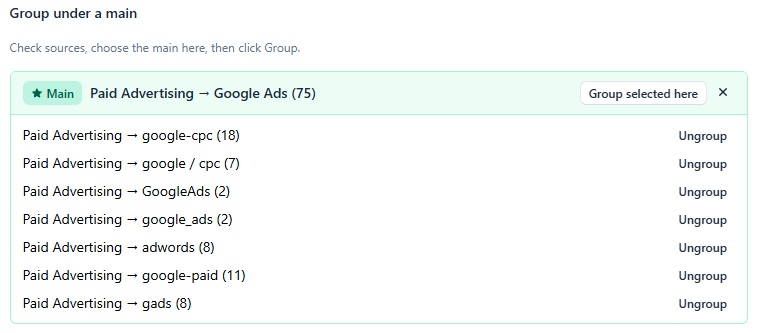
Tame messy lead sources
Every spelling of a source — google-cpc, adwords, google / cpc — grouped under one clean name, so your reporting finally adds up.
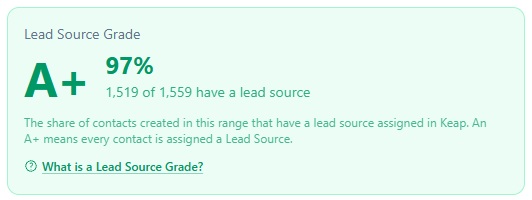
Grade your attribution coverage
See the share of contacts that actually have a lead source attached. Aim for an A+ and stop losing where leads came from.
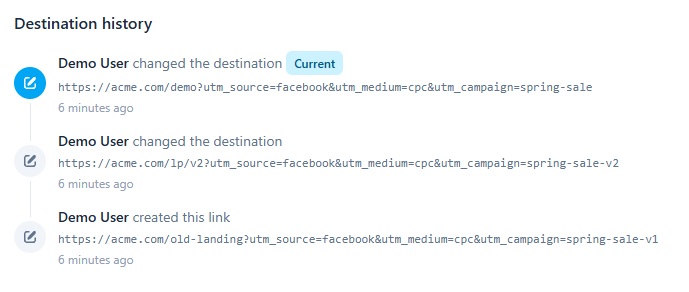
Build and shorten campaign links
Create tagged URLs, shorten them, and change a link's destination any time — the clicks and history stay intact.
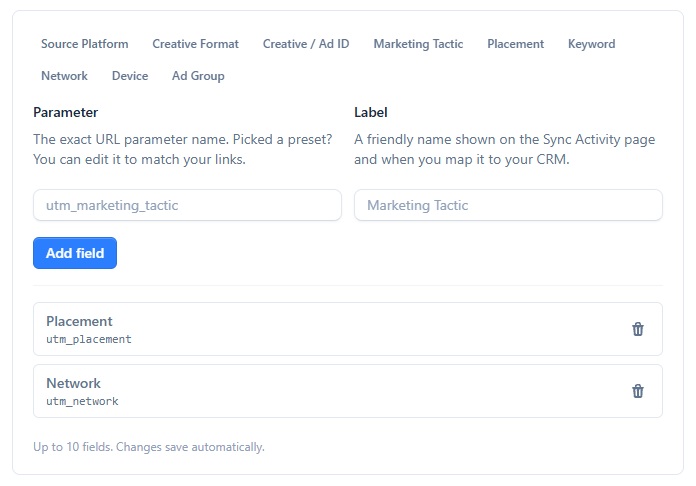
Capture any parameter you need
Define custom URL parameters — placement, ad group, creative — and map them straight into your CRM fields.
Drop the snippet on any site and capture from any form — no integrations to wire up.
Pages & forms
CRMs
No supported CRM? Capture the same attribution and pull it straight from the Leads API into any system.
Simple, flat plans. Start free, upgrade when you're ready — no usage surprises.
Free
Kick the tires, no card required.
- 30 leads synced / month
- Attribution capture + CRM sync
- 10 short links
- 60-day data history
Classic
The essentials — attribution, minus the analytics.
or $468 billed yearly
- Everything in Free, plus:
- Unlimited contacts synced
- URL builder + unlimited short links
- Leadsource organizer
- Tags, timezones & custom fields
Pro
Most popularThe full toolkit, one flat price.
Up to 10,000 leads / month
- Everything in Free, plus:
- Geo-IP location enrichment
- URL builder + unlimited short links
- Lead source reports & clickstream
- Tags, custom fields & full history
Pro is a flat $137 / month for up to 10,000 leads. Bigger volume? Let's talk.
Capture never stops. Cancel any time · 30-day money-back guarantee.
Do I need a CRM?
No. Connect Keap or GoHighLevel and we sync attribution onto the contact automatically — or skip the CRM entirely and pull your captured leads and their attribution straight from the Leads API.
Can I see my visitors in real time?
Yes. The live Clickstream shows visitors as they arrive — attributed and anonymous — with their journey, device, and location, so you can watch traffic land the moment it does.
Do I need WordPress?
No. iTracker360 works on any site — just add one snippet. A WordPress plugin is available if you prefer, but it is optional.
Does it work with my form builder?
Yes. ClickFunnels, LeadPages, Unbounce, WordPress, or any HTML form works — there are no changes to make to your forms.
Where is my data stored?
Captured attribution is stored securely in the United States and synced onto the matching contact in your CRM. We never sell or share your data.
Are there contracts?
No contracts and no minimum commitment. It is pay-as-you-go — pay monthly or annually, cancel any time, with a 30-day money-back guarantee.
Do you offer support?
Yes — premium support plus a full documentation site to get you set up and answer questions.
Does it work with Google and Facebook Ads?
Yes. iTracker360 captures the click IDs and UTM parameters from your paid campaigns so paid traffic is attributed correctly.
See it working in the live demo, or set up your own account in minutes.